The Ultimate Guide to AI for Small Businesses: Tools, Tips, and Real Results
Updated on November 1, 2025 | 17 min. read


You probably already know ChatGPT can write a bad pun or a college essay, but how can you use AI for business?
You’ve definitely heard the buzz: Artificial intelligence (AI) is everywhere, transforming everything from social media posts to the job market. But as a small business owner, you might still be wondering, “How can I actually use AI technology to help my business grow?”
Well, you’re in luck! In this post, we’ll unpack exactly what AI is, explore how AI tools can empower small businesses, and introduce some fantastic, user-friendly, and even free AI tools to get you started. Let’s dive in.
What exactly is artificial intelligence (AI)?
Artificial intelligence, or AI, essentially gives machines the ability to mimic human intelligence. AI technology enables computers to analyze vast amounts of data, recognize patterns, make data-driven decisions, and even create content. Oh, and it all typically takes just a few seconds.
You probably already interact with AI-powered features daily, from Siri and Alexa to the personalized recommendations Netflix makes based on your user behavior. Recently, however, generative AI—a type of AI that generates original content, such as images, videos, text, and even music—has taken center stage. Tools like ChatGPT, DALL-E 2, and Jasper.ai are popular examples that small businesses can leverage to enhance efficiency, creativity, and customer experience.
Types of AI for small businesses
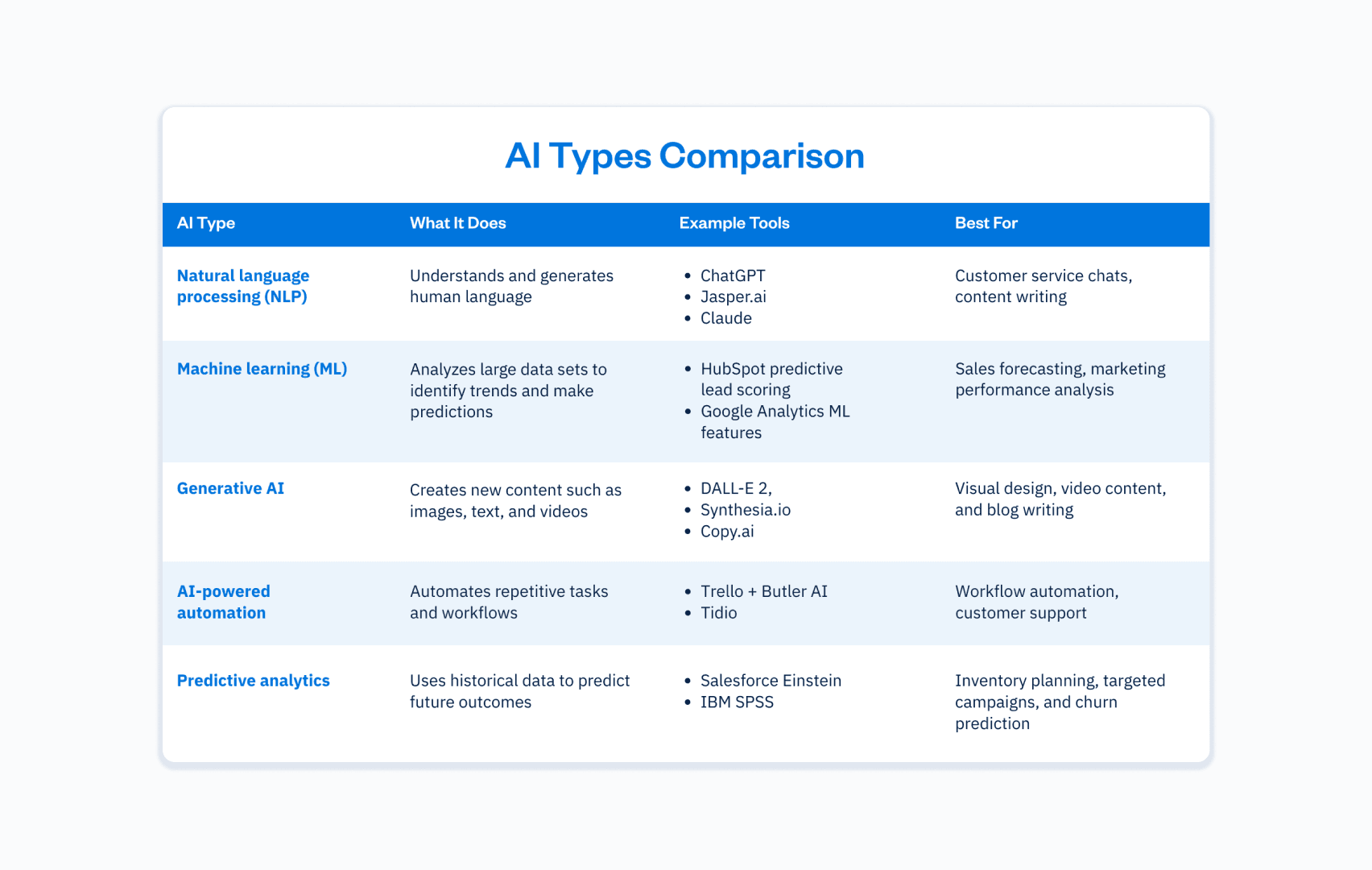
AI isn’t just about creating viral images or writing catchy captions. Behind the scenes, different types of AI are quietly transforming how small businesses operate day in and day out. From tools that understand human language to systems that predict future trends, each type of AI offers unique AI-powered features to make running your business faster and more efficient.
Here’s a quick overview of the main types of AI technology you’ll likely come across, and how they can support your growth.
How can small businesses use AI tools?
From marketing and sales to customer service and productivity, AI capabilities are transforming how small businesses operate.
According to a recent U.S. Chamber of Commerce and Teneo survey, a staggering 98% of small businesses now use AI-enabled software, while 40% leverage generative AI tools like chatbots and image creators to automate marketing and customer support.Here’s how you can start implementing AI to boost your business operations:
Marketing: Turbocharge your touchpoints
AI marketing tools can significantly enhance efficiency and improve customer insights. Here are some standout use cases:
- Market research and competitor analysis: AI can swiftly analyze more data about your target audience and competition, helping you identify trends and opportunities.
- Content creation: Generative AI can help brainstorm ideas, write compelling social media posts, create blog posts, and even produce eye-catching visuals, quickly simplifying your content creation process.
- Social media management: Monitor conversations across multiple channels, respond promptly to customer inquiries, and refine your messaging to better resonate with your target audience
Sales: Close more deals faster
AI can enhance your sales process and lead generation efforts.
- Lead generation: AI lead generation tools identify and nurture leads by analyzing customer data and online behavior, significantly improving your marketing efforts.
- Email campaign automation: Tools equipped with AI technology allow you to automate follow-ups, personalize messaging, and ensure consistent customer interactions.
- Predictive sales analytics: AI analyzes historical data to help forecast sales, streamline inventory management, and optimize pricing strategies, directly contributing to improved profitability.
Customer service: Elevate customer satisfaction
AI-powered chatbots are revolutionizing customer service, helping businesses deliver faster and better customer experiences.
- 24/7 customer service: AI-powered chatbots handle customer inquiries instantly, reducing response times and increasing overall customer satisfaction.
- Automated issue resolution: NLP helps AI tools understand and respond to customer queries, solving common problems without human intervention.
- Message prioritization: AI identifies urgent messages, ensuring your team addresses critical customer interactions promptly.
Automation and productivity: Do more with less
Small business owners know the value of efficiency. AI-driven automation can streamline your business processes and enhance efficiency.
- Reduce operational costs: Automate repetitive tasks such as scheduling and customer follow-ups, giving your small team more time to tackle higher-value activities.
- Improve decision-making: AI easily analyzes vast data pools fast, providing actionable insights to make smarter, data-driven decisions.
- Enhance project management: AI-powered project management tools help manage resources effectively, predict project timelines accurately, and easily optimize workflow management, significantly reducing operational costs.
How to choose the right AI tools for your small business
With countless AI solutions flooding the market, selecting the right tools can feel daunting. To simplify your decision-making process, consider the following, but also talk to your network about what works and doesn’t work for them:
- Business needs: Clearly identify your pain points. Are you looking to improve customer service, streamline your sales process, or enhance marketing campaigns?
- Ease of integration: Choose AI tools that easily integrate with your existing tech stack, processes, and systems to ensure smooth implementation.
- Cost efficiency: Look for affordable or free AI tools that align with your budget and offer clear cost savings and value over time.
- User-friendly interface: Opt for solutions with an intuitive, user-friendly interface, requiring minimal technical expertise.
How to implement AI in your small business (step-by-step guide)
- Identify your goals: Decide exactly what you want AI to achieve for your business–is it faster customer responses, better social media content, or automating data entry?
- Audit your existing tools and processes: List where you spend the most time and identify repetitive tasks AI could handle or support.
- Research and choose the right AI tool: Use the selection criteria in this blog to compare options and start with free trials where possible. Read forums (Reddit) and talk to people in your network to learn how AI has helped them, and which tools they use.
- Train your team: Once you narrow things down and choose a tool, host a quick lunch-and-learn or demo session to show how the tool works and set clear expectations for usage.
- Start small and pilot: Test AI with one process or team before rolling it out business-wide to refine workflows safely.
- Monitor and measure results: Set goals like time saved, leads generated, or improved customer satisfaction to evaluate ROI.
- Optimize and scale: Review AI usage regularly, gather team feedback, and expand into new areas or upgrade plans as your needs grow.
15 AI tools for small businesses
Now that you understand AI’s potential impact, let’s explore some fantastic tools you can start using today. Here’s an updated, categorized list of user-friendly and powerful AI tools tailored specifically for small businesses.
Marketing and content creation AI tools
According to a U.S. Bank survey, 36 % of U.S. small business owners are currently using generative AI tools, while another 21 % plan to adopt one within 12 months, particularly for content creation, data analysis, and marketing.
1. ChatGPT
Meet ChatGPT (although you’ve probably heard of it already), your versatile AI writing buddy that can brainstorm ideas, draft content, and even crack a pun or two to lighten your workday.
Type: NLP chatbot.
Use cases: Brainstorm ideas, generate keyword-rich content, write engaging emails.
- A freelance graphic designer uses ChatGPT to draft proposal emails tailored to each client’s style and brand voice.
Cost: Free (premium $20/month).
Pros: Easy to use, excellent at idea generation.
Cons: Limited knowledge after 2021 (although it can still search for current info).
2. Jasper.ai
Jasper.ai is like having a speedy copywriter on call 24/7, ready to generate high-converting marketing copy in any tone you need.
Type: AI-powered content writer.
Use cases: Create blog posts, product descriptions, and social media posts.
- An online pet store uses Jasper.ai to write SEO-rich product descriptions that improve organic search rankings and increase sales.
Cost: Starts at $39/month.
Pros: Fast content generation, versatile writing styles.
Cons: Costs can add up for extensive use.
3. Copy.ai
Copy.ai takes your prompts and transforms them into catchy headlines, social posts, and emails – perfect for small businesses short on time.
Type: AI content generator.
Use cases: Write ad copy, emails, and social media posts.
A personal trainer uses Copy.ai to generate daily motivational social media captions aligned with client goals and trending fitness hashtags.
Cost: Free option available, paid plans for teams start from $36/month.
Pros: Versatile tones, no word limits on paid plans.
Cons: Free tier can be limited.


4. Claude
Claude is Anthropic’s conversational AI assistant, designed to be helpful, harmless, and honest. It’s perfect for businesses that need an AI chatbot to brainstorm, draft content, answer customer questions, or analyze complex topics with a natural, human-sounding tone.
Type: AI conversational assistant and chatbot.
Use cases: Drafting content, summarizing research, answering customer inquiries, and generating ideas.
- A tech startup founder uses Claude to summarize dense technical whitepapers into digestible LinkedIn posts to grow thought leadership.
Cost: Free with limited features, pro plan $20/month.
Pros: Safe conversational design, broad general knowledge, and natural and human-like responses.
Cons: Less specialized integrations compared to some niche AI business tools.
5. Grammarly
Grammarly is more than a spellcheck, it’s your AI-powered writing coach, ensuring every email, caption, and proposal is clear and confident.
Type: AI-powered writing assistant.
Use cases: Proofreads emails, blog posts, and social media posts with advanced suggestions for clarity and tone.
- A sports apparel e-commerce brand uses Grammarly’s tone suggestions to ensure product page copy feels relatable and friendly for their target audience.
Cost: Free basic plan, premium plans from $12/month.
Pros: Improves customer interactions by polishing written communication.
Cons: Sometimes suggests overly formal phrasing that doesn’t match a casual brand voice, leading to inauthenticity.
Visual and video content AI tools
Marketing departments using AI for video and visual content experience at least a 42% improvement in campaign turnaround times due to AI-generated video solutions.
6. DALL-E 3
DALL-E 3 is your AI art generator that turns text prompts into stunning, original images to wow your audience and upgrade how fast you can deploy visuals for marketing.
Type: AI-powered image generator.
Use cases: Create unique visuals and graphics.
- A custom bakery creates unique cake topper designs with DALL-E 3 illustrations for client mockups.
Cost: Accessing DALL-E 3 through a ChatGPT Plus subscription (which includes access to other OpenAI features like GPT-4) costs $20 per month.
Pros: High-quality images, easy to use.
Cons: Limited free usage.
7. Synthesia.io
With Synthesia.io, you can create professional AI-generated videos featuring avatars that speak your scripts in multiple languages, no studio needed.
Type: AI video creation.
Use cases: Professional videos, training materials, marketing campaigns.
- An HR consultancy produces onboarding videos in multiple languages for global clients without hiring voice actors or video crews.
Cost: Starts at $18/month.
Pros: Multilingual, professional-quality videos.
Cons: Premium features require higher subscription tiers.
8. Pictory
Turn long videos into short, shareable clips perfect for social media with Pictory’s AI video summarizer and editor.
Type: AI video summarizer and editor.
Use cases: Turns long-form video content into short, social-media-friendly clips.
- A coaching business turns hour-long webinars into short teaser clips with captions to promote on Instagram and LinkedIn.
Cost: Starts at $19/month.
Pros: Great for marketing campaigns and repurposing webinars.
Cons: Editing customizations can be limited.
Customer service and experience AI tools
AI chatbots are one of the biggest customer-facing instances of AI, and can help streamline the buying process and lower customer service costs by 30%.
9. ManyChat
ManyChat turns your social DMs into automated conversations, helping you engage customers and generate leads while you sleep.
Type: AI chatbot builder.
Use cases: Builds automated chatbots for messaging apps like Facebook Messenger and Instagram to improve customer service.
- A local hair salon uses ManyChat on Instagram to automatically answer appointment availability questions and collect booking info.
Cost: Free basic plan, pro plans start at $15/month.
Pros: Great for lead generation and customer inquiries on social media platforms.
Cons: Limited to supported messaging channels.
10. HubSpot Chatbot Builder
HubSpot’s Chatbot Builder integrates seamlessly with your CRM to qualify leads, book meetings, and answer FAQs, all automagically.
Type: AI chatbot integrated within HubSpot CRM.
Use cases: Qualifies leads, books meetings, and answers customer inquiries automatically.
- A B2B SaaS company implements HubSpot’s chatbot to pre-qualify leads by industry and company size before routing them to sales reps.
Cost: Included in HubSpot’s free CRM, advanced features require paid tiers.
Pros: Tied to CRM data, improves customer satisfaction, and boosts lead conversion.
Cons: Full functionality requires integration with HubSpot’s ecosystem.
11. Tidio
Tidio combines live chat and AI-powered chatbots to create seamless customer service experiences across your website and social channels.
Type: AI-powered customer service platform.
Use cases: Combines live chat and AI-powered chatbots to handle customer interactions efficiently.
A Shopify apparel store integrates Tidio to answer sizing FAQs instantly, increasing customer confidence and reducing abandoned carts.
Cost: Free basic plan, premium plan from $19/month.
Pros: Enhances efficiency and customer experience across multiple channels.
Cons: Free version limits active chats.
Specialty AI tools for small businesses
A whopping 96% of SMBs that have tried AI tools say they’re effective at streamlining daily tasks. Whether that’s handling scheduling, expense reports, or project workflows, these tools help small teams work smarter, not harder.
12. Otter.ai
Otter.ai is your AI-powered notetaker, transcribing meetings and brainstorming sessions so you can stay focused and never miss a detail.
Type: AI transcription tool.
Use cases: Transcribes meetings, interviews, and brainstorming sessions for quick documentation and project management.
- A legal assistant records client calls and uses Otter.ai to efficiently create time-stamped summaries for case files.
Cost: Free basic plan, premium plan from $8.33/month.
Pros: Saves time on note-taking, searchable transcripts enhance productivity.
Cons: Accuracy may vary depending on the clarity of speech.
13. Trello + Butler AI
If you already love Trello, adding Butler AI will feel like having a virtual assistant that automates your boards and keeps your projects humming smoothly.
Type: Project management tool with AI automation.
Use cases: Enhances Trello boards with AI-powered features to automate task assignments, due date reminders, and workflows.
- A boutique marketing agency automates repetitive board updates, such as tagging cards as “Ready for Client Review” when drafts are attached.
Cost: Butler automation is included in Trello premium plans starting at $10/month.
Pros: Great for small teams and improves project management efficiency.
Cons: Requires understanding of command building for advanced automation.
14. Looka
Need a logo fast? Looka uses AI to design sleek, professional logos for your brand in just minutes.
Type: AI logo design tool.
Use cases: Designs brand logos with minimal technical expertise required.
- An Etsy jewelry seller designs a professional-looking logo with Looka in one afternoon to upgrade packaging and social media branding.
Cost: From $65 per logo download.
Pros: Cost-effective for branding small business AI initiatives quickly.
Cons: Less custom than a human designer.
15. Lumen5
Transform your blog posts or scripts into engaging videos for social with Lumen5’s easy-to-use AI video creation platform.
Type: AI video creation platform.
Use cases: Creates videos from blog posts or scripts for social media posts.
- A real estate brokerage turns blog posts about neighbourhoods into short highlight videos to attract clients on Facebook.
Cost: Free basic plans, premium plans from $19/month.
Pros: Easy content repurposing, no editing skills needed.
Cons: Limited customization on lower tiers.
Legal, ethical, and privacy considerations when using AI
AI tools are powerful, but they come with responsibilities. Here are key considerations for small businesses when using AI tools:
- Data privacy: Ensure AI tools comply with data protection laws like GDPR or CCPA, especially when handling sensitive customer data.
- Intellectual property rights: Check licensing for AI-generated content, such as images or videos, to avoid copyright issues.
- Bias and fairness: AI can inherit biases from its training data. Review outputs critically, especially for hiring, customer messaging, or decision-making.
- Transparency: Be upfront with customers when they’re interacting with AI-powered chatbots instead of human reps.
- Security: Confirm vendors use strong encryption and security protocols to protect customer data and your business information.
When to use (or not use) AI tools for your small business
AI usage is booming, but it’s not a magic wand. Here are some thoughts on when it makes sense to add to your tech stack and workflows, and when you might want to think twice.
Use AI tools when:
- You’re buried under repetitive tasks like data entry or scheduling.
- Your customer inquiries are overwhelming your small team.
- You want to improve customer service and satisfaction through faster responses.
- You need data-driven decisions for your business plan or marketing campaigns.
- You want to reduce operational costs and embrace AI for cost savings.
Avoid AI tools when:
- Tasks require deep human intelligence, empathy, or complex creative nuance.
- You handle highly sensitive data where the risks of data breaches outweigh the benefits of automation.
- Your existing systems don’t easily integrate with new AI tools.

Best practices for adopting AI initiatives
Implementing AI in your business isn’t just about picking a tool and hitting ‘go’. To truly embrace AI and see real results, it helps to follow a few best practices. These will keep your workflows efficient, your team confident, and your AI initiatives aligned with your goals. Here are some essential tips to help you integrate AI technology smoothly and successfully into your daily operations.
- Start small: Test free AI tools for basic functions like content creation or social media scheduling.
- Train your team: Ensure everyone understands how to use AI tools effectively and responsibly.
- Review AI outputs: AI-generated content is fast but requires a human review to ensure accuracy and a consistent brand voice.
- Monitor data security: Choose software solutions that prioritize protecting customer data and integrate secure AI capabilities.
- Measure results: Use predictive analytics to track how AI improves customer satisfaction, sales process efficiency, or marketing efforts.
- Assign an AI champion: Appoint someone on your team to own AI tool onboarding, training, and performance monitoring.
- Test with low-risk tasks first: Before automating customer-facing communications, trial AI on internal workflows like meeting summaries or internal communications.
- Combine AI with human review: AI speeds up drafts, but human oversight ensures outputs match brand voice and quality standards.
- Continuously reassess tools: The AI landscape evolves rapidly, so it’s important to review subscriptions and the effectiveness of tools every quarter.
- Document AI processes: Write clear documentation for AI tool usage so any team member can follow workflows confidently.
The future is AI-powered (but still human-centered)
Adopting AI tools can empower small businesses to automate tasks, improve customer service, and reduce operational costs. However, AI technology should complement, not replace, your team’s creativity, strategy, and personal touch.
AI for small businesses FAQs
Jumping into AI for small business? Ask these questions first.
How much does it cost to implement AI in a business? Are there any free AI tools I can use?
Yes! Tools like ChatGPT, Copy.ai (basic), Grammarly, and Otter.ai offer free plans that empower small businesses to automate tasks and enhance efficiency without upfront costs.
For paid tools or plans, costs vary. Premium AI business tools can range from $10 to $100+/month, depending on features and usage volume.
The majority of owners using generative AI tools have found that adoption doesn’t require a massive investment. Nearly 7 in 10 (68%) Gen AI users report spending less than $50 a month on it, and nearly 1 in 5 (18%) are using free tools or subscriptions.
What are the biggest risks of using AI tools for small businesses?
While AI offers incredible benefits for small businesses, there are a few risks to keep in mind. These include inaccurate outputs or “hallucinations” (when AI confidently gives false or made-up information), especially in content creation. There are also data privacy concerns if customer data isn’t securely handled, potential biases in AI-generated decisions, and overreliance on automation, which could reduce your brand’s human touch. Always review AI outputs carefully and choose tools with strong data security protocols.
How can AI tools improve customer service for small businesses?
AI tools can improve customer service by automating responses to common customer inquiries with AI-powered features like chatbots and virtual assistants. Using natural language processing, these tools understand and answer questions in real time, freeing your team to handle complex tasks that require a human touch. For example, a small café could use an AI chatbot to confirm reservations while staff focus on in-person customers.
Can AI technology help with my small business plan and online reviews?
Absolutely. AI technology can analyze online reviews to identify trends in your products or services, giving you insights to refine your small business AI strategy and business plan. Some AI tools even help with building custom review summaries so you can quickly spot opportunities for improvement and enhance customer satisfaction. Just remember, AI outputs still need a human review to ensure accuracy and brand alignment.
What are some of the most popular AI tools for small businesses?
The great thing about AI is that there are now so many great tools available. So, we went ahead and asked AI for a list of some of the most popular tools for small businesses. Here’s what it told us:
- Canva
- DeepL
- ChatGPT
- QuillBot
- Remove.bg
- Gemini
- Grammarly
- Character.ai
- Quizizz
- Zapier
- Microsoft Copilot
- CapCut
- Midjourney
- Stable Diffusion
- Claude
- Perplexity AI
This article was updated on July 10, 2025.