6 Best Invoice Apps For Small Businesses
Updated on April 9, 2026 | 7 min. read


Your guide to the best invoicing app
Tracking and managing invoices, expenses, and partial payments can be a time-consuming challenge for many small business owners. The right invoicing tools can save you from invoicing stress and streamline the payment process.
But with so many options, how do you know which invoice app is best for you?
In this article, we break down the top invoice apps for small businesses, detail their features, and show how they can help you manage your finances more efficiently.
What’s the best invoicing app?
Below are some of the best invoice software for small businesses that you should consider.
Feature | FreshBooks | Zoho Invoice | QuickBooks | Wave | Invoicely | Invoice Ninja |
|---|---|---|---|---|---|---|
Free plan or trial | 30-day free trial | Free plan | 30-day free trial | Free plan (Basic) | Free plan (Limited invoices) | Free plan |
Recurring invoices |
|
|
|
|
|
|
Automation |
|
|
|
|
|
|
Mobile app |
|
|
|
|
|
|
Time and expense tracking |
|
|
|
|
|
|
Multi-currency support |
|
|
| Limited |
|
|
Third-party integrations |
|
|
| Limited | Limited |
|
Customizable invoices |
|
|
|
|
|
|
Project management tools |
|
|
|
|
|
|


1. FreshBooks
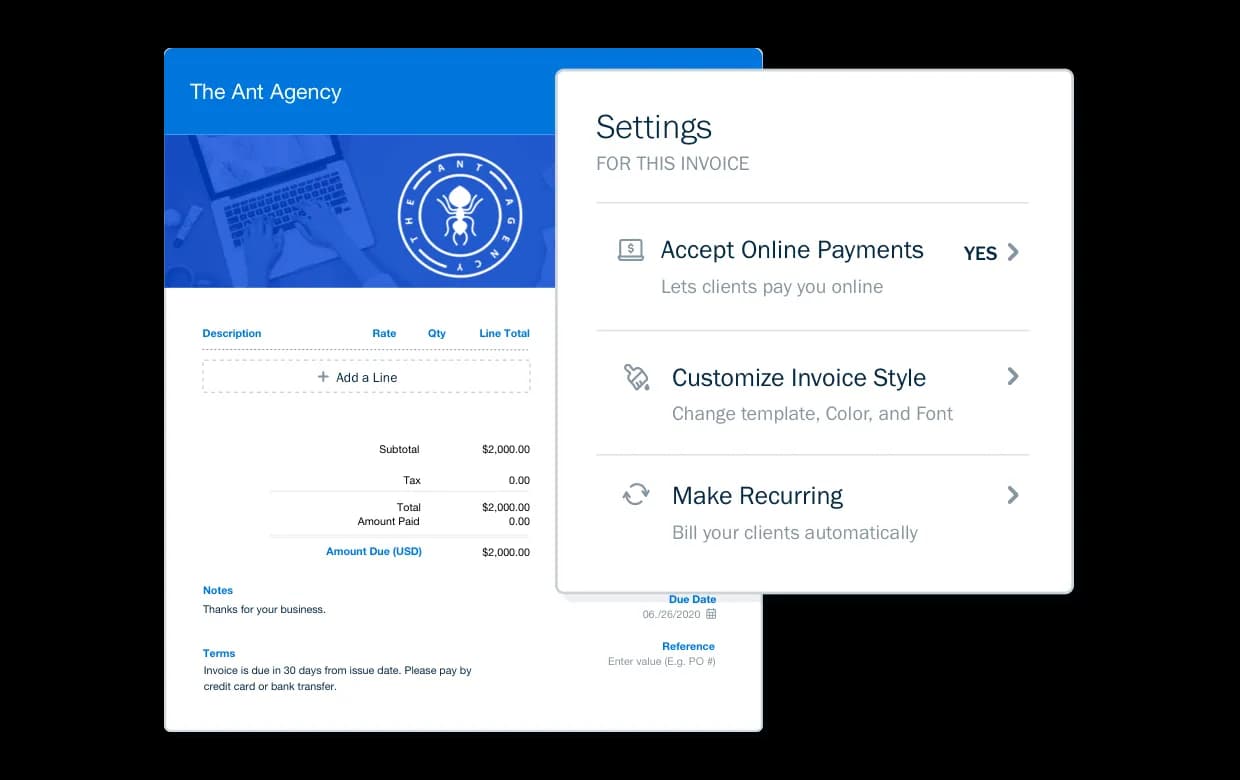
FreshBooks is an all-in-one small business management tool that makes it easy to send professional invoices, set up recurring billing, and accept automatic payments. Clients can pay invoices by credit card, bank transfer, or even pay-over-time options, so you can get paid faster and focus on growing your service-based business.
The platform works on desktop, tablet, and mobile. The app itself makes it easy to send or review invoices anywhere. But FreshBooks is more than invoicing, in just one software, you can:
- automate expense tracking
- accept pay
- manage clients and projects
- review reporting
- Integrate your workflows with more than 100 apps like Gusto and Zoom.
Pros
- user-friendly interface and invoice generator
- invoicing automation with recurring billing and late payment reminders
- mobile app and cloud access for managing finances anywhere
- 30-day free trial with no credit card required
- supports online payments and multiple payment options including ACH payments, credit cards, and Apple Pay /Google Pay
- built-in time tracking and project management tools
- integrates seamlessly with 100-plus business apps
Cons
- limited support for product-heavy businesses
- Payroll is an add-on.
- Some features, like project profitability, are limited to higher-tier plans.


2. Zoho Invoice
Zoho Invoice is a free, stand-alone invoicing tool that helps small businesses automate billing and client communications.
It offers customizable invoices, recurring billing, and automated payment reminders. Users can also create workflow rules that trigger emails, in-app alerts, and field updates. This helps users save time on routine tasks, such as applying late fees or discounts.
It’s part of the wider Zoho ecosystem, which also offers tools for accounting, CRM, and project management if you need additional features.
Pros
- Fee tier currently offers up to 1000 invoices per year.
- multi-currency support
- easy-to-use mobile app
Cons
- The free plan caps how many invoices you can send and offers limited features.
- Help and support can be slower or limited for free users.
- There are limited third-party integrations outside the Zoho ecosystem.
3. QuickBooks
QuickBooks offers powerful invoicing features, and that's in addition to its full suite of accounting tools. It allows you to customize invoices, automate billing, add billable hours, and duplicate templates for similar clients.
Detailed reports track everything from cash flow to profit and loss, helping business owners make smarter financial decisions.
Plans start at $38 USD a month for basic reporting. If you need more advanced features, you can subscribe to a higher tier. Robust accounting tools and automation make it a top choice for larger businesses with more complex invoicing and accounting needs.
Pros
- combines bookkeeping, invoicing, payroll, and reporting
- strong automation and integrations
- scalable for growing teams
Cons
- Advanced features come at the expense of a steep learning curve for many users.
- Feature access depends on your subscription level.
4. Wave Invoicing
Wave Invoicing is another popular accounting and invoicing tool. It's great for anyone who needs to send unlimited customized invoices, track receipts, and manage expenses. There’s a free plan with basic features. But you can get upgraded features, like automated late-payment reminders, on a paid plan.
Wave can also be used to generate accounting reports, search transactions, and reconcile data for accurate records. Wave automatically calculates sales tax and offers clear insights into cash flow.
With tabs for sales, purchases, banking, payroll, and reports, Wave’s interface makes everyday accounting less intimidating for small business owners.
Pros
- free plan with basic features
- strong built-in security and compliance
- unified invoicing and billing workflow
Cons
- Many features, like automatic bank transactions, require a paid plan.
- Multi-currency support is limited.
- Third-party integrations are limited.
5. Invoicely
Invoicely (formerly Invoiceable) is a cloud-based platform that focuses primarily on invoicing. Its free plan covers essential invoicing tools, while paid tiers unlock more advanced features. The Basic plan ($9.99 USD per month) adds time and expense tracking, recurring invoices, and quote creation.
Pros
- Free plan doesn’t require a credit card.
- flexible invoicing with global and multi-business support
- strong customization and branding options
Cons
- The free plan has a strict invoice-per-month and client limits.
- Plans are priced based on the number of invoices sent, which can be challenging for high-volume businesses.
- Some users report weak customer support and service reliability.
6. Invoice Ninja
Invoice Ninja is an open-source invoicing platform built for freelancers and small businesses that want full control without high costs. More than 200,000 companies use it to create and automate invoices, manage projects, and track tasks.
The free plan lets you send unlimited invoices and quotes to up to 20 clients, with support for over 50 currencies and 20 languages.
Pros
- Free tier offers unlimited invoicing.
- in-depth built-in workflow tools
- self-host and open-source option, giving more control over data
Cons
- Has user limits on the free and lower-tier plans.
- Does not support a full-scale accounting system.
- Native integrations are limited.
Criteria for choosing the right invoicing app for small businesses
To find an invoicing app that actually helps you work less, look for these core capabilities:
- Automation features: Choose an app that automates recurring billing and late payment reminders. This reduces manual tasks and ensures you get paid on time.
- Mobile access: A reliable mobile app allows you to track expenses, snap receipt photos, and send invoices from anywhere.
- Scalability: Ensure the software supports your growth. If you work with global clients, the app must support multiple currencies and comply with international tax requirements.
- Data security: Look for encryption and automatic cloud backups. These features protect sensitive client information and prevent data loss.
- Customer support: Technical issues can delay your payments. Prioritize companies that provide responsive support through live chat or phone.
To determine the right invoicing app for your business, consider your business size, transaction volume, and reporting needs. Figure out what type of invoice you need. For instance, small businesses and solopreneurs may prefer an all-in-one tool, like FreshBooks, to streamline workflows and save on software costs.
Most platforms offer a free trial. Use this time to test the interface and ensure the features align with your daily operations.
Accounting software vs. invoicing apps
Both accounting software and invoicing apps play a role in helping manage your business finances. However, they serve different purposes.
Invoicing apps focus mainly on billing, payment collection, and client communication. Accounting software handles a broader range of financial tasks, like payroll, tax reporting, bank reconciliation, and expense tracking. T
There’s often an overlap between the two. Many invoicing platforms (like FreshBooks, Xero, and QuickBooks) include accounting and business management tools. However, standalone invoicing apps such as Zoho Invoice or Invoice Ninja tend to focus only on invoicing, so you may need a separate software to manage your business finances.
Future trends in invoicing apps
Automation and AI are already changing how invoicing apps work, and this will only grow over time. New tools now offer features like predictive billing, smart payment reminders, and automatic reconciliation with payment gateways. All of this helps you save time and reduce manual errors.
Another exciting trend is embedded finance and real-time payments. More invoicing apps are connecting directly with banking APIs, which means you can receive funds faster and get a clearer, up-to-the-minute view of your cash flow.
Compliance and cross-border capabilities are also improving. If you’re planning to do business internationally, you can look forward to broader use of electronic invoicing standards, built-in digital tax tools, and better multi-currency support to make global transactions smoother.
Looking ahead, we expect invoicing platforms to become all-in-one financial hubs. Instead of juggling multiple tools, you’ll be able to manage invoicing, accounting, payments, and reporting from a single, easy-to-use dashboard.
Put your invoicing on autopilot with FreshBooks
If you’re looking for an invoicing app to help streamline your processes, FreshBooks offers a perfect solution. From personalized invoicing to billing, FreshBooks makes it easy to manage your small business all in one place.
Sign up for a 30-day free trial to see if FreshBooks is the right invoice software for you.
Frequently Asked Questions