Easily Track Every Project’s Performance
Updated on October 25, 2025 | 2 min. read



Get a full breakdown of a project’s income, costs, and profits using the Project Profitability feature in FreshBooks.
Let’s say you run a small architecture firm and you’re looking to grow. With multiple employees, clients, and projects to juggle, determining where your profit is coming from can sometimes feel like navigating a maze. You have to download reports, manually calculate profit per project, and go back into your books to confirm Costs, Expenses, and Income. Instead of building up your business, you’re stuck drilling down into data.
To help, FreshBooks has added the Project Profitability feature. It collects and displays all the data you need to make more informed business decisions—right from within your account.
What Is Project Profitability?
Project Profitability is a reporting tool that tracks the performance of your Projects to see how profitable they are. It also helps you manage time and expenses being tracked to Projects by your Team Members, so you can make better business decisions.
How Does Project Profitability Work?
How Do I See My Project Profitability?
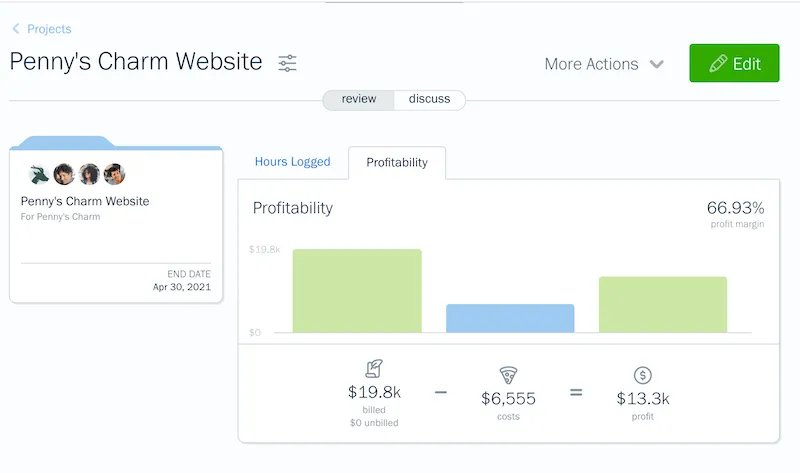
Viewing your Profitability Graph is easy, and takes just a few steps!
- Log in to your FreshBooks account.
- On your Dashboard, select Projects from the left navigation.
- Select a Project from your Projects list.
- Click the Profitability tab next to Hours Logged.
Here’s what it looks like in-app:
Who Has Access to Project Profitability?
What Else Can Project Profitability Help Me With?
With the data collected, Project Profitability can help you determine:
- Which projects/services are most profitable
- How to price a project/service properly
- How to assign the right employees to projects
- What project pipelines can help you better handle cash flow in the future
- Which Services are costing the most and lowering margins
- How your project is tracking against the original estimate
How Else Can I Track Project Profitability?
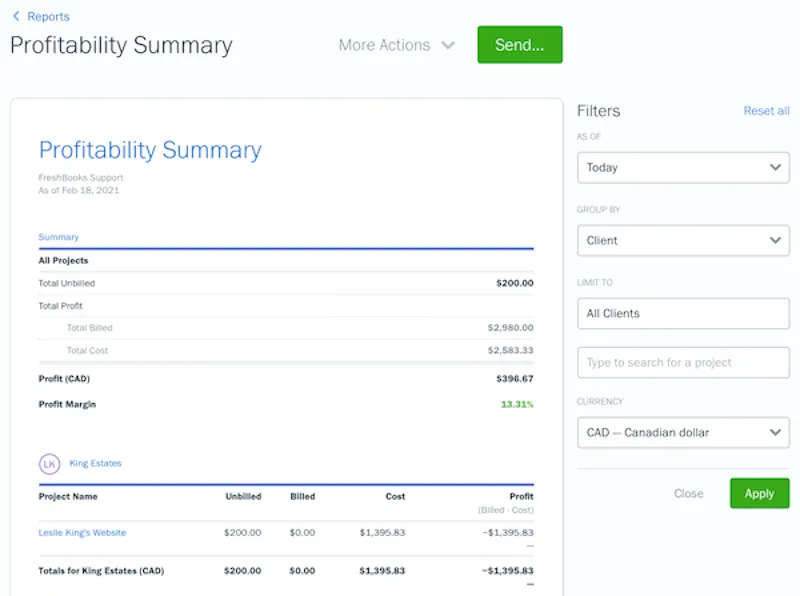
Profitability Summary Report
Profitability Details Report

What Are Team Cost Rates and How Do I Set Them?
Team Cost Rates are how much you pay your Team Members. Setting these rates helps you better manage profitability on projects, by balancing the money you spend against the money you make.
To set your Team Cost Rates, either:
- Go to the My Team section, click a Team Member, and click Set Rates, or
- Go to the Projects section, edit or create a Project, and click Set Cost Rates.
Once entered, a Cost Rate is used on all Projects.
FreshBooks Is Here to Help
If you have any questions about Product Profitability, a team of Support Rockstars is ready to help you out. Contact them here.