How to Fill Out a W-2: A Box by Box Guide for Employers
Updated on February 23, 2026 | 12 min. read



🌟 KEY TAKEAWAYS

Form W-2 is an essential document that employers must provide to their employees annually.
Almost anyone hired as an employee in the U.S. will receive a W-2 form.
The deadline for an employer to provide employees with a copy of your Form W-2 is January 31 of the following year.
Form W-2 provides information for federal, state, and local income taxes.
W-2 forms also include other important income and tax information, such as details on retirement plan contributions, health insurance premiums, and Social Security and Medicare wages.
The quickest way to receive a copy of your Form W-2 is to ask your employer or HR department.
Form W-2 is simple to fill out when you take it step-by-step and read the instructions thoroughly.
To ensure accurate W-2 filing, always verify information and amounts, leave yourself lots of time, and keep copies of all W-2s for your records.
The objective of Form W-2 is to report an employee’s annual gross income to the IRS while providing a full description of the taxes withheld by the employer on the employee's behalf. This information tells the IRS what the employee’s estimated income tax liability is and whether they owe income taxes or are entitled to a tax refund.
Only employees who have earned at least $600 throughout the year, or anyone who had Medicare or Social Security taxes withheld from their pay, need to receive a W-2 form.
In this article, we’ll go through the form, box by box, to explain how to fill out W-2 forms so that you’re better equipped to navigate questions if they come up and verify that the form is completed correctly.
Table of Contents
How to obtain your Form W-2
Your employer will give you a copy of your Form W-2, Wage and Tax Statement, and this is the quickest way to obtain it. If the form is not available online, it must be mailed or hand-delivered to you by January 31 of the following year. If you don’t receive your copy in the mail by mid-February, check in with your company’s HR department to confirm they have mailed it and that they have your correct address. They may also give you instructions on how to access your Form W-2 online.
If your Form W-2 has yet to arrive, you should contact the IRS, as a delay in receiving your W-2 may put you in danger of missing the income tax return filing deadline unless you are proactive in letting the IRS know.


How to fill out Form W-2
As an employer, you must provide W-2s to your employees every year. If you find the instructions provided by the IRS on Form W-2 hard to follow, here are the main points to make the form easier to complete as a small business owner.
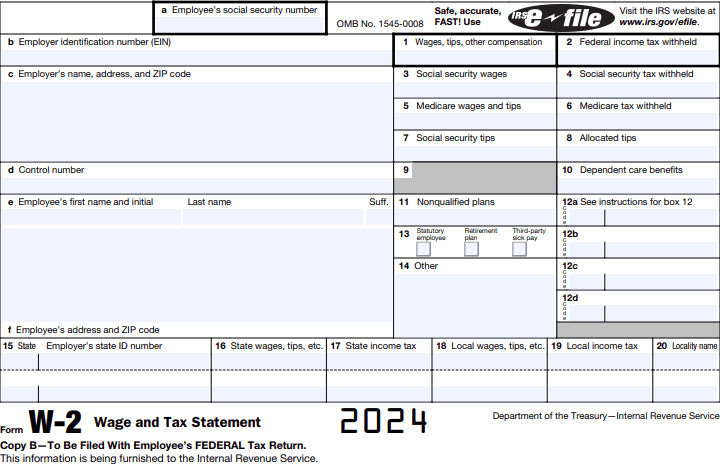
Box A: Social Security number (SSN)
Include the employee’s Social Security number (SSN). The SSN is a 9-digit number in the format XXX-XX-XXXX. Here’s a handy tool to find SSNs. If one of your employees has applied for an SSN but hasn’t received it yet, leave this box blank and write “Applied for” in Box A of the Social Security Administration copy. When the employee receives their SSN, you will then need to file an updated W-2 that includes their number.
Box B: Employer Identification Number (EIN)
Enter your Employer Identification Number in Box B. It’s a common mistake to include an employee’s Social Security number here. While both are nine digits, EINs are formatted as XX-XXXXXXX. This number will be the same on all W-2 forms that you complete.
Waiting on your Employer Identification Number? Write “Applied for” in this box.
Box C: Your company's name and address
Box C lists your company’s legal name and address (which may be different from the address where your employees work).
Box D: Control number
If your business uses control numbers to identify various W-2 forms and keep records of them, you would include the numbers in Box D. The control number field is optional—if you don’t use them, just leave this section blank.
Boxes E and F: Employee name and address
Enter employee names as shown on your Forms 941, 943, 944, CT-1, or Schedule H (Form 1040) in Box E. You can also verify employee names using their SSNs. If an employee's name is too long, use their initials for their first and middle names. It’s more important to have the full last name of your employee on IRS Form W-2. You will also need to enter each employee’s address and postal code in Box F.
Box 1: Wages, tips, and other compensation
Include employee wages, tips, and any other compensation that is subject to federal income taxes in Box 1. Don’t include any payments that are not taxable, such as pre-tax retirement contributions, commuter benefits, and insurance premiums. Click here to learn more information about Box 1 of Form W-2.
Box 2: Federal income tax withheld
Enter the amount of federal income taxes that have been withheld from the employee’s paychecks and remitted to the IRS throughout the year. Federal tax withholding is based on each employee’s taxable wages and filing status.
Box 3: Social security wages
Include the employee’s social security wages here. Don’t include the pre-tax deductions, which are exempt in this box. There’s a chance this number will differ from the one in Box 1. The Social Security Administration doesn’t require employees to pay Social Security taxes once they earn more than $176,100 in 2025 (only wages up to $176,100 are subject to Social Security taxes).
Box 4: Social security tax withheld
The same concept applies here as in Box 2. Use Box 4 to list the total amount of Social Security tax you withheld from an employee’s Social Security wages and tips. Be sure to include only the amount your employee paid, not your share. Generally, both the employer and the employee pay the Social Security and Medicare taxes owed (Box 6), splitting the amount 50/50.
Box 5: Medicare, wages, and tips
The amount of employee wages subject to Medicare tax is the same as the wages subject to Social Security tax. The only difference is that there’s no wage limit for this tax. So if your employee earned more than the Social Security wage base, Box 5 will show a higher amount than Box 3.
Box 6: Medicare tax withheld
This is the same concept as Box 4. Box 6 shows the total amount of Medicare taxes withheld from an employee’s wages. The employee's share of this tax is 1.45% of their wages.
Box 7: Social Security tips
If your employee earns and reports tips, you’ll enter the total amount of tips subject to Social Security taxes in this section. Include the amount in Boxes 1 and 5 as well. Box 3 plus 7 shouldn’t exceed $176,100 for the tax year 2025.
Box 8: Allocated tips
This box only applies to companies that allocate tips to their employees. Not all employers allocate tips, so check if you need to fill out this section. The IRS requires large food and beverage employers to allocate tips if the total reported tips for a pay period are less than 8% of gross sales. Because allocated tips are not included in your employee’s taxable wages on Form W-2, you should not include this amount in boxes 1, 3, 5, or 7. Employees who receive allocated tips must calculate their taxable income using Form 4137.
Box 9: Blank
Leave this box blank. It was previously used to report advance payments of the Earned Income Credit, a program that was discontinued in 2011.
Box 10: Dependent care benefits
Include dependent care benefits in this box if applicable. You should only fill out this section if you provided employee dependent care benefits under a dependent care assistance program. When calculating dependent care amounts, remember that benefits over $5,000 are taxable, so include the excess amounts in Boxes 1, 3, and 5.
Box 11: Nonqualified plans
Use Box 11 to report any employer distributions you made to a nonqualified deferred compensation plan, such as a salary reduction plan for an employee. Include these deferred compensation distributions in Form W-2 Box 1 as well.
Box 12: Codes
You may need to put certain codes on an employee’s Form W-2 for some types of benefits and compensation. You can include up to 4 codes on a single W-2 form. For more codes, you’ll need another W-2 form. Put code on the left of the line, and the amount on the right. The code letter does not relate at all to the box’s letter in Form W-2. For example, you can insert code B on box 12A.
As of 2024, there is a new Code II for Medicaid waiver payments excluded from gross employee income and a new Code II for Box 12 used to report Medicaid waiver payments that were not included in Box 1.
The detailed instructions for each code are available on the IRS website.
Box 13: Checkboxes
Box 13 should not include any values. Instead, mark all boxes that apply to the three listed boxes.
Check the first box if you’re preparing Form W-2 for a statutory employee (a certain type of independent contractor).
Check “retirement plan” if you entered code D or E in Box 12.
Check the third box if reporting sick pay payments made by a third party.
Box 14: Other
Use this box to report other information given to the employee (for example, state disability insurance taxes withheld, vehicle lease payments, and health insurance premiums deducted).
Boxes 15 through 20: State and local specific
Complete these boxes if you have a state income tax reporting requirement (don’t forget the employer’s state ID number). If boxes don’t apply to you, leave them blank. Do you need to report state income tax for more than two states? If so, you’ll need a separate W-2 form.
To report state income tax information, you must include your state ID number (state EIN) on Box 15. For boxes 16 to 20, follow a similar process to boxes 1 to 4. Some wages may be exempt from federal income tax, but not state or local income tax, so Boxes 16 and 1 may differ. You can contact your state, city, or local tax department for more information.
There have been a few changes to Form W-2 regulations in the past two years. New regulations in 2025 regarding Form W-2 include:
- There is a new procedure to request an extension for the deadline to furnish recipient copies of Form W-2, you must now complete and fax Form 15397, Application for Extension of Time to Furnish Recipient Statements, to request an extension.
- As of 2025, the IRS is offering tax relief to people affected by certain disasters over the past year.
- Penalties for failing to file and furnish W-2s, as well as for intentional disregard of filing and payee statement requirements, have increased due to inflation—see the IRS website for more info.
- Employers with 10 or more employees must file Forms W-2 electronically.
- There is a limit on health Flexible Spending Arrangements (FSAs), disallowing cafeteria plans that allow employees to request salary reduction contributions above $3,300.
- Additional Medicare tax must be applied at a rate of 0.9% on any Federal Insurance Contributions Act (FICA) wages or Railroad Retirement Tax Act (RRTA) compensation. The employer must withhold this tax when the compensation or pay exceeds $200,000 and continue withholding it for the rest of that year.
How to file a W-2 form
Once your W-2 forms have all been accurately filled out, it’s time to file them with the Social Security Administration (SSA) and furnish your employees with their copies. The due date for filing W-2 forms is January 31 each year, and failing to meet this deadline can result in steep penalties.
You can submit the forms electronically (recommended) or by mail. If you want to send in physical copies, you can request the forms via the IRS website.
Once you’re ready to file, you’ll need to fill out and send multiple copies of each W-2:
- Copy A goes to the SSA.
- Copy 1 is sent to your state, city, or local tax department.
- Copy B is sent to employees for attachment to their federal tax returns.
- Copy C is sent to employees to keep for their records.
- Copy 2 is provided to employees to be filed with their state, city, or local income tax returns.
- Copy D is for your records as the employer.
Best practices for filling out W-2 forms
If you paid employees over the past tax year, it’s essential that you understand how to properly complete and file W-2 forms. In order to ensure compliance with tax rules and deadlines, follow these best practices:
- Use an online payroll tool to generate W-2 forms automatically.
- Always verify all employee information for each W-2 you complete.
- Double-check all amounts before filing.
- Leave plenty of time for the W-2 process so you don’t have to rush.
- Make sure to furnish your employees and the SSA with copies of all W-2 forms by the January 31 deadline.
- Keep copies of all W-2 forms for your records.
- Ensure you’re using the most up-to-date version of Form W-2.
Simplify your W-2 process with FreshBooks
As a business owner, you should know how to complete a W-2 for a single employee or for your entire team. Even if you’re not in charge of payroll and taxes, it’s always a good idea to have fundamental knowledge about tax forms in case an employee has a question or needs help.
Once you know the basics, let payroll software do the rest. FreshBooks Payroll software can help you keep track of your payroll expenses and ensure all employee taxes are ready for tax time. Make life easier for yourself and try FreshBooks free today.


FAQs about how to fill out Form W-2
We hope this article has answered your questions about filing taxes with W-2 forms. For more insight, please read the answers to these frequently asked questions below.
What is a W-2 form used for?
Form W-2 is a tax document your employer fills out to let the IRS know how much money you’ve earned in the year, federal and local income withholding information, the pretax benefits that your employer provided to you, and other information regarding taxable income.
Do you fill out the W-2 yourself?
No, your HR department or employer will fill out the W-2 for you. There is no need to know how to fill out a W-2 as an employee, as it’s your employer’s responsibility. That said, you should double-check that all of the information is correct.
What are the rules for filing a W-2?
The most important rule for filing W-2 forms is that Copy A must be submitted by mail or electronically to the SSA, along with the transmittal form, by January 31 at the latest. Copies B, C, and 2 must go to your employee before February 1 as well.
How do you file your W-2 yourself?
Individuals don’t file their own W-2 Forms. This is done by the employer. If you are a freelancer, an entrepreneur, or a sole proprietor, your income is reported through the business, not as earnings on a W-2. You would use a 1099 Form instead.
What is the difference between a W-2 and a W-4?
The difference between a W-2 and a W-4 is that the employer completes the W-2 and sends it to the SSA to report an employee’s earnings and how much tax withholding was taken off paychecks. The employee completes Form W-4 when they first start a job, to tell the employer how much tax to withhold from their paychecks.
How to deal with an incorrect W-2
If you’ve discovered a W-2 error as an employee, have your employer issue a new form. If they refuse, file a Form W-2 complaint with the IRS. As an employer, you can correct a W-2 by creating a new version and sending it to the IRS before January 31.
Article sources