How to Invoice as a Freelancer: A Step-By-Step Guide
Updated on February 13, 2026 | 14 min. read


Your guide on how to invoice as a freelancer.
You’ve secured a client, created the contract, and done the work—now it’s time to get paid. The key to getting paid? Sending a professional invoice.
In this step-by-step guide, we’ll take you through how to invoice as a freelancer and best practices for getting paid faster. Plus, we’ll look at common invoicing mistakes, dispute-resolution tips, and how the right invoicing software can make invoicing a breeze.
🌟 KEY TAKEAWAYS

Proper invoicing is key to getting paid promptly as a freelancer.
Your invoice should include key details, such as contact information, product or service breakdowns, total cost, and payment information.
Software or downloadable templates can help streamline your invoicing.


What to include on a freelance invoice: The essential elements
What exactly makes up a winning freelancer invoice structure? Here are some of the essentials.
Your business information
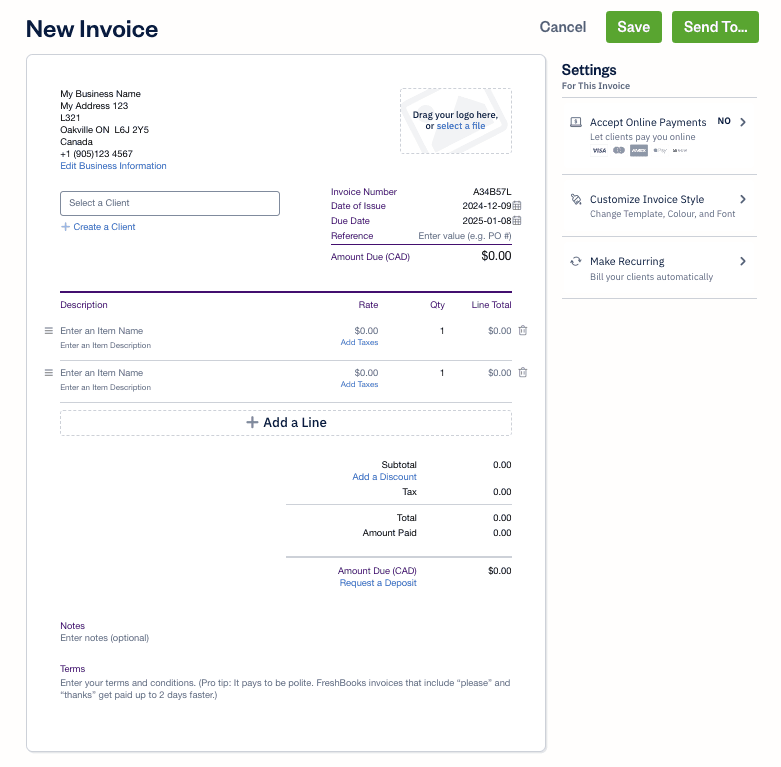
When you're creating a freelance invoice, start by adding your own business information near the top of the page. This information helps your client immediately identify who's sending the invoice. Include:
- business name
- logo (if you have one)
- business address
This section establishes your professional identity and makes your invoice instantly recognizable.
Your business contact information
Typically placed at the bottom of your invoice, your contact details makes it easy for clients to reach you with questions or concerns. Include:
- phone number
- email address
This ensures your client knows how to contact you if they need to discuss payment details or have any invoice-related questions.
Client’s contact information
You'll also need to add your client's information to confirm the invoice is intended for them. Include:
- client name
- company name (if applicable)
- business address
- contact person or contact information
This helps your client quickly verify that the invoice is meant for their business and ensures it reaches the right person for processing.
Invoice number
Every invoice you generate should include a unique invoice number to help you and your client keep invoices organized. An invoice number helps for recording and managing invoices internally, and it’s also key for helping clients locate an invoice when they’re receiving multiple invoices. Particularly for recurring clients, invoice numbers offer a straightforward system to identify which invoices have been settled and which remain outstanding.
Every invoice needs a unique number—for example, 001, 002, 003, etc. You might choose to restart your invoice numbers at the start of the calendar or billing year, or keep them rolling for each client. If you’re using an accounting and invoicing software like FreshBooks, it can automatically generate invoice numbers for quick and accurate tracking.
Invoice date and due date
Invoice dates (also known as the issue date) are essential for organization and for tracking payment terms. Payment terms start on the date the invoice was sent—for example, a 2-week term for an invoice sent on May 1 means payment is due from May 15.
While the due date is implied with the invoice date and payment terms, it’s still helpful to list it clearly. Terms like net 15 and net 30 mean that the client has 15 days and 30 days, respectively, from the invoice date. It’s also helpful to include a calendar date—like, "Due May 15"—so the client doesn’t have to do any calculations.
Including the invoice and due dates makes it easier to check payments with your clients. For example, if you’re still waiting for payment, invoice dates make it easier to say, "We still have an outstanding cost for the May 1 invoice, which was due on May 15," and the client can confirm that by checking the invoice date.
Cost breakdown and total cost
Now, let’s get down to what invoicing is all about—the goods and services provided and the payment due. The cost breakdown is one of the most important parts of your invoice, and it should be detailed and accurate. For each good or service, you’ll want to include an itemized list with the following details:
- a detailed description of the good or service rendered
- quantity of the good or service
- the rate that you charged for each unit of that good or service
Once you’ve broken down the information about each product or service, you can include information for totals:
- subtotal of goods and services
- taxes
- total amount due by the client
Having a clear breakdown of what the client is paying for reduces the likelihood of a disputed invoice and helps you get paid faster.
Payment method
Alongside clear amounts, breakdowns, and due dates, there’s one other component that helps you get paid quickly—clear payment methods and a seamless payment process. The goal is to make it easy for your clients to pay you, ideally with several different payment options. These could include multiple payment options, such as:
- electronic transfer
- bank transfer
- check
- credit card
- other online payment methods
For whichever payment methods you offer, include the payment details in your invoice. If you offer payment via check, list the business name they should make out the check to, as well as the address to send it to. For bank transfers, include your banking details.
Speedy payment tip: Offer online payment options? Include a link directly in the invoice, so all your clients need to do is click it to get immediately directed to your payment page.
Payment terms
In addition to basic payment terms like net 15, net 30, etc., and the payment due date, note any other terms, like late payment fees. While you’ve probably already included all of this in your contract, a quick, friendly reminder note can help clients reference your terms without having to dig through the contract.
Branding and personal elements
While branding and personal touches aren’t essential, they’re a nice way to make your invoice stand out and be memorable. This can include visual details like your logo, or a personal thank-you message or slogan at the end of the invoice to help it feel like a human connection rather than just a routine transaction.
How to create and send your freelance invoice in 5 simple steps
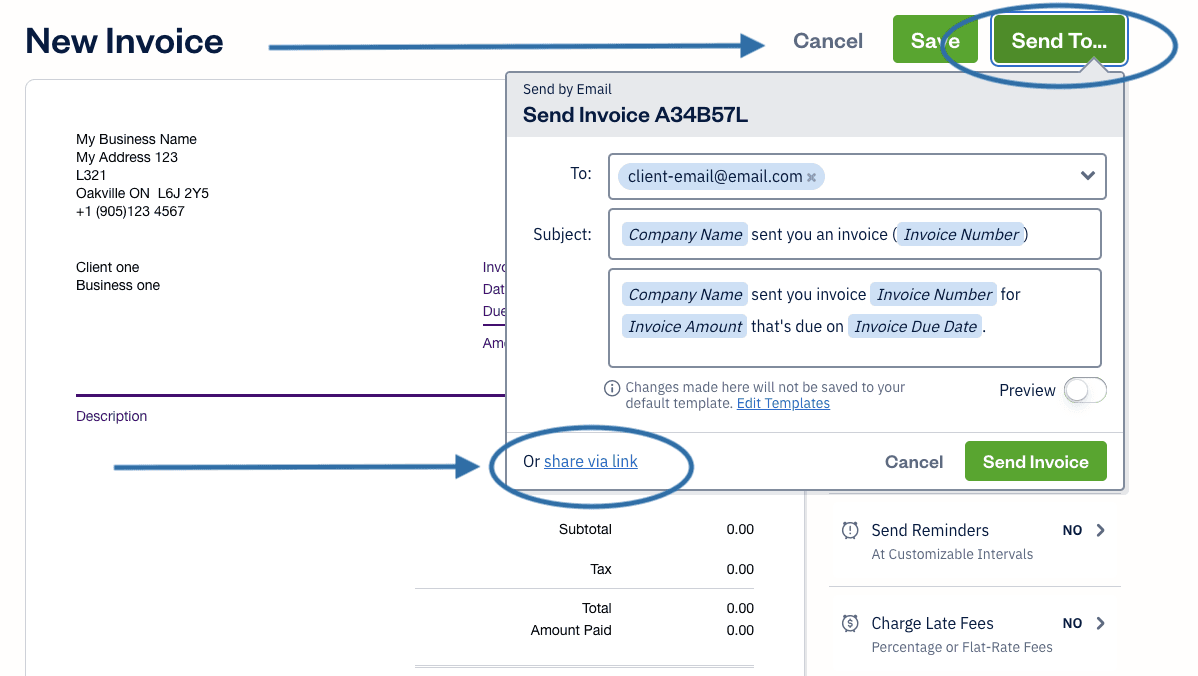
Not sure where to start with invoicing? Follow these 5 simple steps to get started creating your first freelance invoice.
Step 1: Track your billable time and deliverables
Whether you charge by hour or by project, clear tracking is key to creating an accurate invoice.
For hourly work
If you charge by the hour, it’s essential to accurately track your time so you can provide your clients with clear billing information. Time-tracking software helps you not only track hours worked, but also specific tasks, so you can be accountable for what you did during each work period. Including this information in your invoices keeps clients in the loop about what you’ve achieved. Make sure to also include your hourly rate on your invoice.
For project-based work
Even if you’re charging based on deliverables rather than time, keeping a detailed work log that includes your hours is helpful. Break the project into milestones and update your client on your progress. It’s also beneficial to check in with the client throughout the project to ensure you’re on the same page about timelines and scope.
Step 2: Choose your tool (software vs. template)
Both software and templates can streamline your invoice generation. If you only generate the occasional invoice, templates are often enough. However, if you send a large volume of invoices, invoicing software can boost your productivity by minimizing the time spent creating them.
Integrated invoicing and payment software like FreshBooks can also support your business by allowing you to send invoices with payment links, so you can easily accept payments through the same software system.
Step 3: Fill out the invoice details
Once you’ve selected your software or template, fill in the essential invoice elements—including payment details, client information, and due dates. Depending on your payment terms, you might include the full project in 1 invoice or send multiple invoices throughout the project.
Step 4: Save your invoice professionally
Remember to keep a clear and detailed log of every invoice you send. Save it as a PDF with a clear file name—for example, Invoice-[Number]-[ClientName].pdf. This makes it easy to track down if you want to refer to it later.
Step 5: Send the invoice promptly and politely
Faster invoicing leads to faster payments, so aim to send your invoice for freelance work as quickly as possible after work is completed. This is also when the project is fresh in the client’s mind, encouraging them to pay promptly. Include a brief, professional message in your email along with the attached invoice. Try something like:
“Thank you for your business, it’s been a pleasure working together. I’ve attached your invoice below; payment is due by May 15. Please feel free to reach out with any questions, and I look forward to working together again.”
You can even create an email template to save time when sending future invoices.
Understanding common payment terms for freelancers
It’s important to include the right payment terms on an invoice to make sure you get paid correctly. Explore these common payment terms to find the right fit for your business.
Net terms
‘Net’ in payment terms simply means the number of days following the invoice date. For example, net 15 means the client has 15 days from the invoice date to pay their balance. The most common net terms are net 15, net 30, and net 60.
If you wish, you can also offer early payment discounts under this system. For example, net 60, but clients can receive a 10% discount if they pay within the first 10 days to ensure prompt payment.
Payment in advance
Payment in advance means that the client needs to pay part or the full amount before the goods or services are delivered. In this case, you’ll send the invoice in advance, and payment needs to be received before delivery.
Milestone payments
Milestone payments mean that you’re paid for specific project phases, and payment must be received before you begin the next phase. This is a common payment term for large or long-term projects where you don’t want to risk a major labor investment without getting paid along the way. It’s common practice to send an invoice after each milestone.
Retainer payment
A retainer is a fee paid in advance to secure services. This isn’t typically part of the payment for the services themselves, but rather to ensure a professional is secured for work during a given period. Think of it almost like a reservation payment as a restaurant—the client isn’t purchasing food, but they’re guaranteeing a table. Retainers use a recurring invoice for ongoing services rendered—for example, monthly payments. Depending on the contract, future invoices may be applied to the retainer payment.
6 invoicing best practices to get paid faster
Say goodbye to waiting around for payment. Skip the delay and encourage clients to pay promptly with these 6 invoicing tips for fast payment.
1. Invoice promptly
Try to send your invoice promptly as soon as your work is completed. This makes it easier for your client to settle up as part of the project and encourages same-day or quick payment.
2. Check the important details
When in doubt, err on the side of too much information. Be specific with your line items and provide a detailed breakdown so the client can reference the invoice rather than having to email you with questions.
3. Know your client
Make sure you send the invoice to the right department. For example, if they have a specific person assigned to your project or to invoicing and accounts, you’ll get paid faster than if you just send it to a general contact email.
4. Choose the right payment terms
While net 60 might sound appealing because it feels generous and flexible, the extra time makes it more likely for the client to forget about the invoice. Instead, opt for tighter payment terms like net 15 to encourage quick payment.
5. Include multiple payment methods
It’s easier for your client to pay quickly if they have multiple ways to pay. While this isn’t always an option for everyone, even just 2 payment methods (for example, check or PayPal) increases the likelihood of quick payment. Other flexible payment alternatives, including pay-over-time options or a payment plan can make it easier for clients to pay.
6. Offer incentives
It’s up to you whether you prefer to incentivize quick payments or penalize late payments. Whichever you choose, offering early payment discounts or late payment charges can help encourage clients to pay on time.
How to handle common invoicing problems
Even with invoicing software and templates, invoicing mix-ups get the best of us. Here’s how to avoid common mistakes and what to do if an issue arises.
Common invoicing mistakes to avoid
Stay ahead of the problem by learning to avoid these common invoicing errors.
- Mixing up invoices: Sending invoices to the wrong clients, including the wrong information, or scrambling totals and payment terms can all lead to delays. Double-check all your invoices before you send them, and remember to include invoice numbers and dates to reduce the likelihood of a mix-up.
- Forgetting tax information: It’s easy to skip tax info, especially if you work with interstate or international clients.
- Forgetting payment terms: Even if you include terms like net 30, your client may not know what that means. Always include a clear payment date in your terms.
- Not including payment method details: Never leave your client hunting for payment info. The easiest option is to include payment links, but it’s also important to remember bank details and other information for different payment methods.
What to do in an invoice dispute
While invoice disputes are never fun, it’s helpful to have a clear plan of action if they arise. Here are some tips for managing invoice disputes:
Step 1: Clarify the issue
Start by clarifying the client’s concern. Are they disputing the total charge, the payment terms, or the work that you did? Make sure you’re on the same page about the issue.
Step 2: Review the invoice
Go over your invoice to make sure that everything is correct and that there were no mix-ups with amounts and details.
Step 3: Review the contract
If everything in the invoice is correct, confirm that it matches the contract. For example, if the client is disputing the payment date, check to make sure that your contract specifies payment timelines.
Step 4: Explore solutions
Based on the issue, the invoice, and the contract, look for solutions that are acceptable to you and your client. Are you willing to extend the payment date if they have cash-flow issues? If you feel the client is in the wrong and you have supporting evidence from the invoice and contract, you may want to seek legal support if you can’t resolve the issue. However, it’s usually a friendlier approach to offer other solutions before seeking legal support as a last resort.
Freelance invoicing software and templates
Tired of spending ages on a finicky invoice format? Invoicing software and free templates help you skip the frustrating parts and get straight to filling in your details and collecting payment.
Why use invoice software?
Invoicing software helps streamline your invoicing so you can boost efficiency, accuracy, and speed. One of the best ways to improve your invoicing is with multi-function software like FreshBooks, which offers invoice generation, payment processing, and expense tracking. This allows you to automate every part of the billing process while creating professional-looking invoices. For example, you can automatically track your time, then convert that into an invoice that accurately shows your client what you’ve been working on. They can then follow the payment link in the invoice, and FreshBooks will process the payment for an easy, all-in-one system.
Interested in trying invoicing software? Explore how to make an invoice with FreshBooks for a hands-on tutorial.
Download a ready-to-use freelance invoice template
A downloadable or free invoice template can be a great solution if you only need to send a few invoices. You can choose from common invoice templates for Microsoft Word, Google Docs, Excel, and other platforms for a quick and easy way to format your invoice.
Choosing an invoicing system
Not sure which system is the best fit for your freelance business? This table lays out the key features of each invoicing option to help you find your perfect invoicing method.
Invoicing software (like FreshBooks) | Word/Excel invoice templates | Online invoice generators | |
|---|---|---|---|
Efficiency | Higher | Lower | Lower |
Time tracking | Yes | No | No |
Professionalism | Higher | Lower | Lower |
Payment processing | Yes | No | No |
Software integrations | Yes | No | No |


While all 3 options are generally easy to use, invoicing software is the only one that integrates with other features like time tracking and payment processing. This speeds up your overall process, making it the strongest option for overall efficiency and professionalism.
How to invoice if you are in other self-employed professions
Invoicing when you’re self-employed follows the same basic structure as freelance invoicing. You’ll want to include all the same basic information, but there’s a bit of nuance and things to pay attention to depending on your employment structure.
How to invoice as an independent contractor
If you work as an independent contractor, it’s important to be aware of any self-employment taxes that you’ll have to pay at the end of the tax year. Some of these may influence your invoicing—for example, if you charge taxes, you’ll need to include this in your invoices to properly collect and remit it.
How to invoice as a consultant
One of the key nuances of consulting invoicing is specificity in your line items. It’s not enough to just list ‘consulting services.’ Your invoice should specify the project you worked on and details about the type of work you did (for example, researching, proposal writing, editing, etc.).
How to invoice as a subcontractor
When you’re invoicing as a subcontractor, there’s a good chance your client is managing multiple subcontracting invoices, so it’s important to be very clear about your services, invoice number, and payment date. Remember to include any materials purchased as part of your contract, in addition to the hours or projects worked.
How to invoice as a sole proprietor or sole trader
Sole proprietors, also known as sole traders, are liable for several taxes, including income tax and self-employment tax. Reviewing your tax obligations before invoicing helps you understand what to include on your invoices.
Streamline your freelance invoicing with FreshBooks
Ready to take your freelance invoicing to the next level? Invoicing software like FreshBooks streamlines your invoicing process for faster, more efficient invoicing. Tools like integrated time tracking help you keep track of your work, while automated invoice generation converts that information into professional invoices to send to your clients. You can also collect payments, create invoice schedules, and automate things like late payment prompts to encourage clients to pay their invoices. Try FreshBooks free to get started boosting your invoicing today.
Frequently Asked Questions