Find It Fast: Advanced Search for Invoices
Updated on August 31, 2026 | 2 min. read



Looking for an invoice from 2 weeks ago, 2 years ago or 20 clients ago? FreshBooks’ new Advanced Search feature helps you find the invoices you need to see, when you need them.
Every successful small business owner has been there. Business has picked up, so you’re juggling multiple clients with plenty of projects on the go. You’re diligently sending invoices, but it’s virtually impossible to remember the details of every last one of them.
Maybe you want to remember what you charged for a particular project a few months ago so you can be consistent with your pricing. Or you might want to double-check that you got the taxes right on an invoice to an international customer. Sometimes clients have questions about invoices past and you’ve got to put your eyes on the original document.
In the old days, you’d scroll through your several pages of invoices until you came upon the one you need.
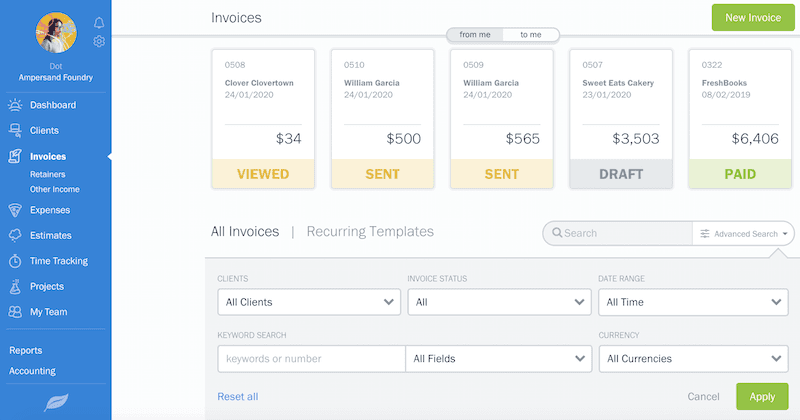
No more. FreshBooks has just rolled out a new feature designed to save you time and make your life easier: Advanced Search for Invoices. You now have the ability to filter your invoices by Client, Status, Date and even keywords instead of scanning through all your invoices.
Here’s How Advanced Search Works
Looking for a specific invoice but can’t remember the details? You can:
- Do a keyword search, e.g. “newsletter article” or “logo design”
- Search by client, e.g. “Fred’s Friendly Fries”
- Filter by status, e.g. “draft”, “sent”, “viewed”, “paid”
- Isolate the date, e.g. 11/18/18
Even if that information escapes you, there are more filters you can use:
- Search all invoices with a combination of details
- Use keywords to search by item description, item name or even in the notes of an invoice
- Look for numeric values in invoice numbers, amounts or reference numbers
TIP: Do you find yourself conducting the same search again and again? No problem. You can actually “save” your advanced search settings as a bookmark in your browser. We’ve embedded your search terms into the URL so as long as you save that bookmark, you can simply launch the URL and your settings will work.
Where to Find Advanced Search for Invoices
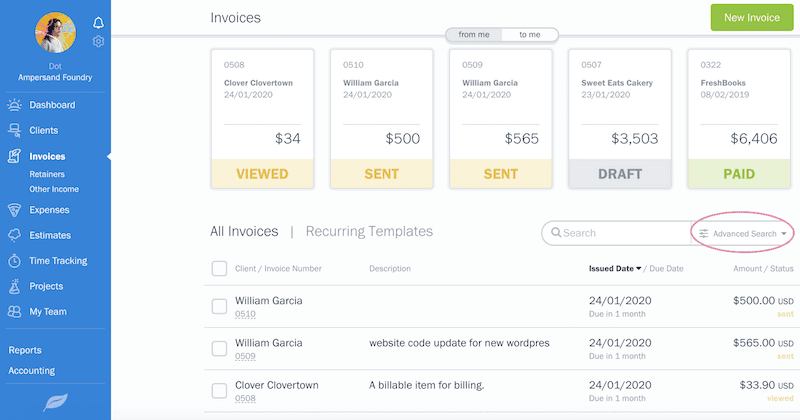
You can locate the new advanced search widget just above your list of invoices. It’s been seamlessly integrated into the Invoices feature you know and love.
With FreshBooks’ new Advanced Search option, you’ll avoid frustration and impress your clients and accountant with your ability to put your finger on information quickly and easily. More importantly, you’ll save precious time so you can get back to more exciting parts of running your business.
Have More Questions?
Don’t hesitate to email us at support@freshbooks.com with your questions. If you’d rather speak with a human, our award-winning Support Team will answer your call in three rings or less.